
 Get Started Now!
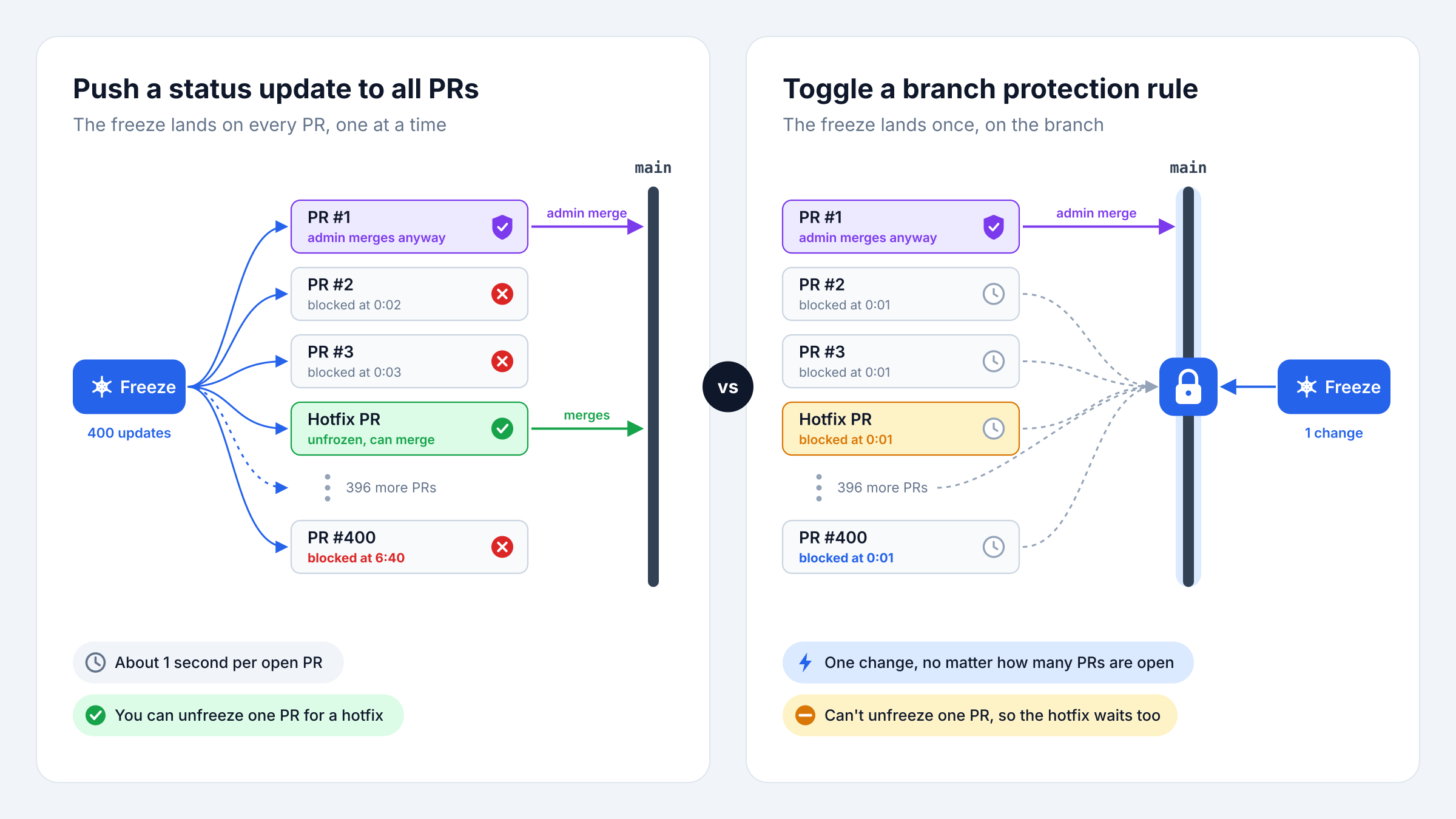
Push Status Update Method
- Default method upon installation
- Works by pushing a status update to each PR
- Time to freeze/unfreeze is about 1 second per PR
- Merge queue PRs fail right away when repository is frozen
- Developers see a failing required check when repository is frozen

Advantage –> Allows unfreezing individual PRs (e.g hotfixes)
Disadvantage –> It can take multiple minutes to freeze/unfreeze all open PRs
Toggle Branch Protection Rule Method
- Works by toggling a branch protection rule on the repository
- Time to freeze/unfreeze is about 1 second total
- Merge queue PRs wait until the queue times out, then get dropped when repository is frozen
- Developers will see a pending required check when repository is frozen

Advantage –> Time to freeze/unfreeze is not dependent on the number of open PRs, so it’s fast!
Disadvantage –> Does not allow unfreezing individual PRs
How to Decide Which Method to Use
Let’s compare and contrast
- Neither method changes your settings for merge queues, rulesets, or branch protection rules.
- Both methods allow admins to bypass the freeze, as long as the “Do not allow bypassing the above settings” option is not checked in the branch protection rule.
- Both methods are compatible with GitHub merge queues, but the status check method is faster for queued PRs.
- When unfrozen, the toggle method does not have a visible Merge Freeze indicator on PRs, while the status check method shows an “OK to merge” Merge Freeze message on all PRs.
| Push a status update to all PRs | Toggle a branch protection rule | |
|---|---|---|
| Where the freeze lives | A failing mergefreeze check on each open PR | A required mergefreeze check on the branch rule |
| Time to freeze | About 1 second per open PR | About 1 second total |
| Setup | Add ‘mergefreeze’ as a required check | None; Merge Freeze edits the rule, and creates one if needed |
| Unfreeze one PR | Yes | No |
| What developers see | A red mergefreeze check | A pending check, waiting until unfreeze |
| Admins exception* | Yes | Yes |
| GitHub merge queue | Queued PRs fail right away | Queued PRs wait until the queue times out, then get dropped |
| Used by | 89% of installs (default) | 11% of installs |
[*] Admins can merge as long as the “Do not allow bypassing the above settings” option is not checked in the branch protection rule.
Which method is best for your team?
Small team with only a few open PRs –> push a status update method for flexibility
Larger team with 100+ open PRs –> toggle branch protection rule method for speed
Require “Unfreeze single PR” functionality for non-admins –> must use push a status update method
Allow admin bypass of the freeze –> either method works, but the toggle method is faster
Using GitHub merge queue –> either method works, but push a status update method is faster for queued PRs
Take Home –> The best freeze method for your team depends on your workflow, need for speed, GitHub permission settings and number of open PRs.